EntityFrameworkCore
This article describes how to use Orca with EntityFrameworkCore store.
Setup
First add the Orca.Store.EntityFrameworkCore package into your project.
.NET CLI
dotnet add package Orca.Store.EntityFrameworkCore
Package Manager
Install-Package Orca.Store.EntityFrameworkCore
In the Program.cs, register the EntityFrameworkCore store:
builder.Services
  .AddOrca()
  .AddEntityFrameworkStores<ContosoDbContext>();

builder.Services.AddDbContext<ContosoDbContext>((sp, options) => {
  var configuration = sp.GetRequiredService<IConfiguration>();

  options.UseSqlServer(configuration.GetConnectionString("Default"), sqlServerOptions =>
  {
      sqlServerOptions.MigrationsAssembly(Assembly.GetExecutingAssembly().FullName);
  });
});
AddEntityFrameworkStores method configures Orca stores to use EntityFramework persistence.
The DbContext to be configured must inherit from OrcaDbContext.
Migrations
To create a migration named InitialCreate:
.NET CLI
dotnet ef migrations add InitialCreate
PowerShell
Add-Migration InitialCreate
To apply the migration and create the database schema:
.NET CLI
dotnet ef database update
PowerShell
Update-Database
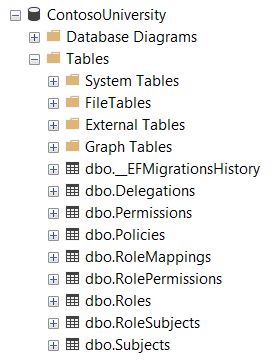
At this point the database should be created.